AI VIDEO MAKER FOR ANDROIDA photo is
A photo is
just the start.
Find a video effect, add your photo, and guide the movement with a custom prompt.

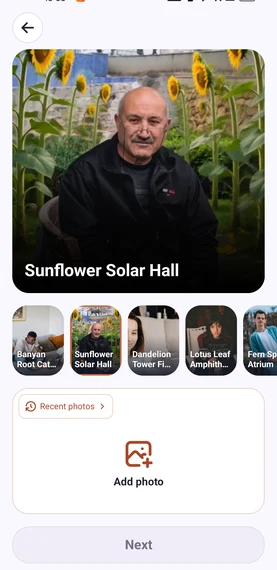
Photo to video Your creative direction AI effects to explore Save & share
01 / THE INSPIRATION FILESWhat if you
What if you
followed that idea?
A softer world. A bolder portrait. An impossible place.
Pick a spark, borrow a prompt, make it yours.
A few imagined possibilities. Concept artwork, not actual app output.
02 / FROM A SPARK TO A STORYThere’s more than one
There’s more than one
way to begin.
You bring the curiosity. Talvori brings the tools.
No timeline. No complicated editing. Just you, creating.
PHOTO TO VIDEO
A familiar moment. A fresh beginning.
Start with a photo from your camera roll. A portrait, a place, a little everyday magic. Choose an effect and let your image become the first frame of something new.
- Choose a photo you have permission to use
- Pick your effect and generation settings
- Create, then save your favorite result
You don’t need a studio.
You need a little curiosity.
The best ideas often start with “what if.”
Give yours somewhere to go.
03 / GOOD QUESTIONSA little clarity.
A little clarity.
Before you create.
Something else on your mind?
Talk to our support team01What can I create with Talvori?
Talvori turns your photos and creative ideas into AI-generated videos. Explore effect templates or guide your photo with a custom prompt, then choose from the generation settings available in the app.
02Do I need any editing experience?
No editing experience is needed. Choose an effect, add your photos and follow the steps in the app. For more creative control, describe the scene and movement you want with a custom prompt.
03Can I use my own photos?
Yes. Use photos you own or have permission to use, including permission from the people pictured when needed. The effect you choose will tell you whether to add one photo or two.
04Are there paid features?
Some features and generations require diamonds, a subscription or a purchase. Check the price, included benefits and generation requirements shown in the app before confirming a purchase.
05How do I keep my creations?
Save finished videos to your device from My creations. Generated videos are available in the app for a limited time, so download the ones you want to keep before the availability period shown in the app ends.
06How can I get help or make a privacy request?
For app support, email elizabethkelly856@gmail.com. For developer or privacy inquiries, contact hank.myers@exceltrain.lol. You can also read our Privacy Policy and Terms of Use.
MADE FOR ANDROIDYour next idea
Your next idea
looks good on you.
Meet Talvori. Your pocket-sized space for bigger ideas.
Ask about app availability Contact our team for download and availability details. TalvoriIMAGINATION, IN MOTION.
04 / WE’RE HERE TO HELPLet’s stay
Let’s stay
in touch.
APP SUPPORT
A hand with Talvori.
elizabethkelly856@gmail.comQuestions, feedback or help with your creations.
Privacy PolicyABOUT THE DEVELOPER